





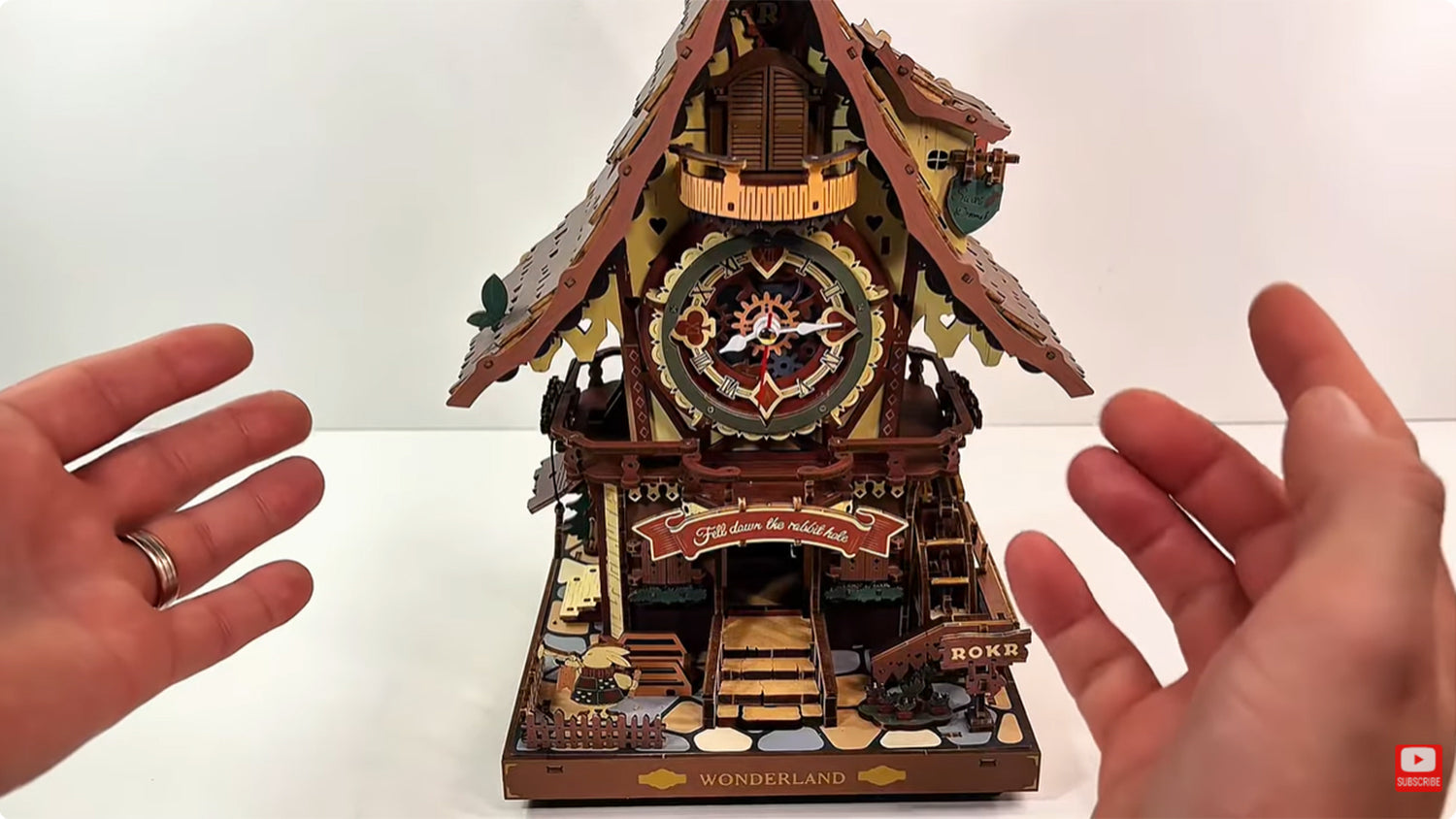
Wenn Sie die ROKR Kuckucksuhr zusammengebaut haben, sie aber nicht zur richtigen Stunde schlägt, sind Sie nicht allein. Viele DIY-Bastler erleben dieses Problem unmittelbar nach dem Zusammenbau. Glücklicherweise ist die Lösung einfach und kann ohne Spezialwerkzeug oder Demontage des gesamten Bausatzes durchgeführt werden.
Dieser Blog bietet eine Schritt-für-Schritt-Anleitung, damit Sie den stündlichen Schlag Ihrer ROKR Kuckucksuhr wiederherstellen können. Lassen Sie uns direkt loslegen.
Diese Anleitung stammt von @MartinsAssemblyHaven, und Sie können sich auch seine Videos für bessere Lösungen ansehen.
Schritt 1: Überprüfen Sie den Vogel und den Schlag
Der erste Schritt besteht darin, zu prüfen, ob der eigentliche Vogel und der Schlag so funktionieren, wie sie sollten. Gehen Sie zur Rückseite des Modells, da Sie dort Ihren Bausatz mit Strom versorgen werden. Sie können ein Typ-C-USB-Kabel verwenden, das Sie unten am Bausatz einstecken können, oder Sie legen drei AAA-Batterien in das Batteriefach ein.
Gehen Sie als Nächstes zur Vorderseite des Modells. Drücken Sie den kleinen Knopf unten am Bausatz. Wenn der kleine Vogel herausspringt, seinen Ruf abgibt und wieder hineingeht, ist alles bereit.

Drücken Sie dann die Stufe an der Vorderseite des Bausatzes und halten Sie sie gedrückt. Das Licht sollte zwei- oder viermal blinken. Wenn es zweimal blinkt, ist der stündliche Schlag eingeschaltet. Wenn es viermal blinkt, bedeutet das, dass der stündliche Schlag ausgeschaltet ist.
Wenn Vogel und Schlag nicht richtig funktionieren, könnte dies an einer Fehlverkabelung oder einer Fehlfunktion eines Teils liegen. Sie können bei Bedarf Ersatzteile zur Auswechslung bestellen.
Schritt 2: Das Pendel anhalten
Nehmen Sie einen langen Schraubendreher mit einer kleinen Spitze und halten Sie das Pendel an. Auf der Rückseite des Modells befindet sich eine Schraube auf einem schwarzen Rad, die Sie mit dem Schraubendreher drehen können.

Jedes Mal, wenn Sie gegen den Uhrzeigersinn drehen und sobald die interne Stunde überschritten wird, sollte der Schlag ausgelöst werden. Auch wenn die Uhrzeit nicht mit dem Schlag übereinstimmt, müssen Sie dies testen.
Schritt 3: Die Stromversorgung trennen
Nehmen Sie die Batterien heraus oder ziehen Sie das Typ-C-USB-Kabel ab. Stecken Sie dann den Schraubendreher wieder dort ein, wo die Schraube auf dem schwarzen Rad sitzt, und drehen Sie sie langsam gegen den Uhrzeigersinn, bis Sie ein kleines, sanftes Klicken hören.

Sobald Sie das Klicken hören, halten Sie inne. Halten Sie den Schraubendreher in Position, damit sich das Rad nicht weiterdreht.
Schritt 4: Die Uhr kalibrieren
Gehen Sie zum Zifferblatt an der Vorderseite des Bausatzes. Ignorieren Sie den Sekundenzeiger und konzentrieren Sie sich auf den Stunden- und Minutenzeiger. Bewegen Sie den Stunden- und den Minutenzeiger gemeinsam auf eine beliebige volle Stunde, wie 12, 1, 2 oder 3. Stellen Sie sicher, dass beide auf einer der Stunden stehen, um die Uhr zu kalibrieren.

Während Sie den Schraubendreher immer noch festhalten, drehen Sie ihn gegen den Uhrzeigersinn, um die genaue Zeit einzustellen, auf die Sie die Uhrzeiger gestellt haben. Drehen Sie weiter, bis Sie das Klicken hören.
Schritt 5: Strom wieder einschalten
Gehen Sie zur Rückseite des Bausatzes, legen Sie die drei AAA-Batterien in das Batteriefach ein oder stecken Sie Ihr Typ-C-USB-Kabel ein. Die Uhr sollte jetzt funktionieren. Sie können den Schlag ein- und ausschalten, um zu testen, ob alles perfekt ist.

Die Kuckucksuhr funktioniert einwandfrei.
Sie können weiter testen, ob der Schlag zu jeder vollen Stunde erfolgt. Stecken Sie dazu den Schraubendreher in die Rückseite des Bausatzes, um die Schraube gegen den Uhrzeigersinn zu drehen, bis die nächste Stunde erreicht ist, und prüfen Sie, ob der Schlag erfolgt. Wiederholen Sie den Vorgang, um sicherzugehen, dass es zu jeder Stunde schlägt.
Tipps und häufige Fehler, die man vermeiden sollte
- Wenn sich die Schraube nicht leicht bewegen lässt, halten Sie inne. Erzwingen Sie nichts, da dies interne Teile beschädigen könnte.
- Ein Überdrehen der Schraube könnte den Mechanismus verstellen. Nehmen Sie stattdessen kleine, schrittweise Anpassungen vor.
- Stellen Sie sicher, dass die ROKR Kuckucksuhr waagerecht hängt. Wenn sie uneben an einer Wand oder Oberfläche hängt, kann dies das Pendel beeinträchtigen, was wiederum die Zeitmessung oder Schlaggenauigkeit beeinflussen kann.
- Diese mechanische Uhr benötigt keine Schmierung. Wenn Sie jedoch Teile schmieren möchten, stellen Sie sicher, dass Sie spezielles Uhrenöl verwenden.
Häufig gestellte Fragen (FAQs)
Was ist, wenn meine Uhr zur halben Stunde schlägt, aber eigentlich zur vollen Stunde schlagen sollte?
Ein Schlagen zur halben Stunde könnte darauf hindeuten, dass die Schraube auf der Rückseite des Bausatzes falsch ausgerichtet ist. Gehen Sie zur Rückseite des Bausatzes, trennen Sie die Stromversorgung, stellen Sie die Zeiger auf die gewünschte Stunde und drehen Sie die Schraube mit einem Schraubendreher gegen den Uhrzeigersinn, bis Sie ein sanftes Klicken hören.
Was ist, wenn der Schlag verzögert oder zu spät erfolgt?
Eine Verzögerung von ein paar Sekunden ist bei mechanischen Modellen wie der ROKR Kuckucksuhr normal. Eine lange Verzögerung kann jedoch bedeuten, dass das Pendel zu langsam schwingt. Prüfen Sie, ob die Uhr waagerecht hängt und ob das Pendel frei schwingt.
Muss ich meinen Bausatz schmieren?
Nicht unbedingt. ROKR mechanische 3D-Puzzles sind für den Trockenlauf konzipiert. Das Hinzufügen von Öl kann Staubansammlungen verursachen und die Uhr stoppen. Wenn Sie das Gefühl haben, dass Teile schwergängig sind, verwenden Sie ausschließlich spezielles Uhrenöl, damit sich die Teile frei bewegen.
Sollte ich die Schraube verwenden, um die Zeit jeden Tag einzustellen?
Nein. Sie wird nur für die Ersteinrichtung oder Fehlersuche verwendet. Sobald Sie Ihren Schlag auf die Stunde eingestellt haben, sollte alles reibungslos laufen. Tägliche Zeitanpassungen können über den Minutenzeiger vorgenommen werden.
Muss ich die Uhr zerlegen, um den Schlag zu reparieren?
Absolut nicht. Diese Anleitung bietet eine schnelle, einfache Lösung, die keine Demontage erfordert.
Warum ist der Klang meines Kuckucks schwach?
Wenn der Kuckucksruf schwach ist, prüfen Sie den Freiraum des Kuckucksarms, die Pendelstärke oder zu fest angezogene Teile. Lösen Sie zu feste Verbindungen, damit alles reibungslos funktioniert.
Abschließende Gedanken
Die oben genannten Schritte bieten eine detaillierte Anleitung zur Wiederherstellung des korrekten stündlichen Schlags Ihrer ROKR Kuckucksuhr. Es ist schnell, effektiv, DIY-freundlich und erfordert vor allem keine Demontage. Wenn Ihre Uhr also das nächste Mal nicht zur richtigen Stunde schlägt, keine Panik. Das Befolgen dieser Schritte wird Ihnen helfen, das Problem im Handumdrehen zu lösen.


Ehinomen Ihendeson
Ehinomen is an expert SEO content writer who loves all things creative and hands-on! With a deep passion for storytelling, creative lifestyle, and hobby niches, she has crafted engaging and search-engine optimized content since 2022.
Robotime ist ein kreatives Lifestyle-Unternehmen, das sich auf das Design und die Entwicklung von 3D-Puzzles, Spielzeug und Holzhandwerk spezialisiert hat. Abonnieren Sie uns, um mehr zu erfahren.
Ehinomen Ihendeson
Ehinomen is an expert SEO content writer who loves all things creative and hands-on! With a deep passion for storytelling, creative lifestyle, and hobby niches, she has crafted engaging and search-engine optimized content since 2022.
Robotime ist ein kreatives Lifestyle-Unternehmen, das sich auf das Design und die Entwicklung von 3D-Puzzles, Spielzeug und Holzhandwerk spezialisiert hat. Abonnieren Sie uns, um mehr zu erfahren.


7 Kommentare
De koekoek komt wel naar buiten maar gaat dan niet weer naar binnen
Paul Steensel van der Aa
Mon coucou sonne avec 30 minutes df retard il est stable comment resoudre le problrme
Roussel
my bid does not flap its wings when it cookoos
Nico Lauw
no matter what I do the chime will not work on the hour. It will chime every 15 mins after the hour. what am I doing wrong. Ive done it watching your how to guide .
JUDY NAPIER
I have adjusted the chime many times and it is still 2-3 minutes late. Is this the best I can do?
Dottie
De koekoek roept elk uur maar 3 keer, wat kan het probleem zijn. Graag reactie.
jan Heijne
cuckoo does not come out even after pressing bottom step
Colin Gronow
Hinterlasse einen Kommentar
Diese Website ist durch hCaptcha geschützt und es gelten die allgemeinen Geschäftsbedingungen und Datenschutzbestimmungen von hCaptcha.